

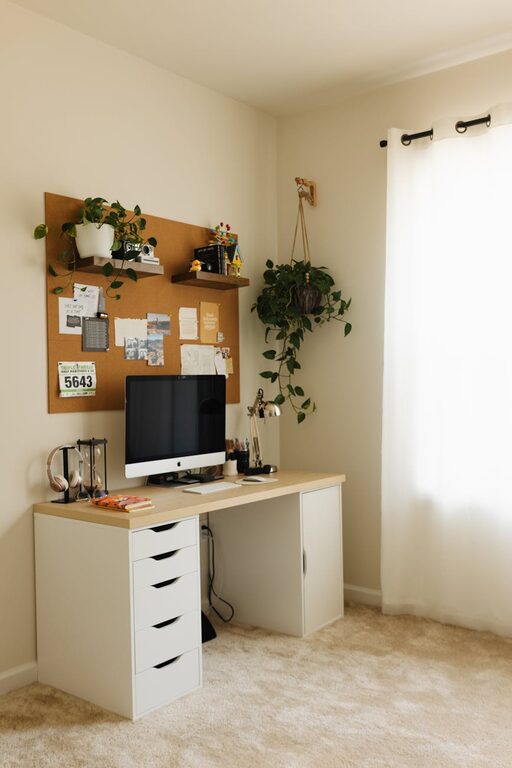
Creating a home office that is both cozy and productive can transform your work-from-home experience. Whether you’re freelancing, managing a remote team, or handling personal projects, the right environment can significantly enhance your focus and motivation. Here are practical tips to help you set up a home office space that feels welcoming and supports your work needs.
Choose the Right Location
Find a Quiet Spot
Select a part of your home with minimal distractions. A quiet corner or spare room is ideal. Avoid areas with heavy foot traffic or loud noises, as these can interrupt concentration.
Maximize Natural Light
Try to place your desk near a window to take advantage of natural daylight. Exposure to natural light can improve your mood and reduce eye strain.
—
Invest in Comfortable Furniture
Ergonomic Chair
A supportive desk chair is essential for long hours of work. Look for an ergonomic chair that encourages good posture and reduces back pain.
Sturdy Desk
Choose a desk that fits your space and work style. Whether you prefer a large surface for multiple monitors or a compact table for a laptop, make sure it’s sturdy and at a comfortable height.
—
Organize Your Workspace
Keep Essentials Within Reach
Arrange your most-used items—like pens, notebooks, and chargers—within easy reach to minimize interruptions.
Use Storage Solutions
Utilize shelves, drawers, or baskets to keep clutter under control. A tidy space helps keep your mind clear and focused.
—
Personalize Your Environment
Add Cozy Elements
Incorporate soft textures like a plush rug, cushions, or a throw blanket to make your office feel inviting.
Decorate with Plants and Art
Adding greenery or artwork can boost creativity and make the space more enjoyable.
—
Manage Lighting and Screen Setup
Use Task Lighting
Supplement ambient light with a desk lamp to reduce eye strain during evening work sessions.
Position Your Screen Properly
Your monitor should be at eye level and about an arm’s length away to maintain good posture and prevent neck strain.
—
Minimize Distractions
Set Boundaries
Inform household members of your work hours and create signals, such as closing the office door, to minimize interruptions.
Use Noise-Canceling Tools
If background noise is unavoidable, consider noise-canceling headphones or white noise machines to help maintain concentration.
—
Incorporate Break and Movement Opportunities
Schedule Regular Breaks
Set reminders to stand up, stretch, or walk around every hour. This helps reduce fatigue and improves focus.
Add Space for Stretching
If possible, leave a small area for light exercise or yoga breaks during the day.
—
Maintain Good Air Quality and Temperature
Ventilate Regularly
Keep fresh air flowing by opening windows or using an air purifier.
Control Temperature
Ensure your office stays comfortable throughout the day by adjusting heating or cooling as needed.
—
Use Technology Wisely
Reliable Internet Connection
A strong and stable internet connection is essential for online meetings and research.
Digital Organization Tools
Use calendars, task managers, and note apps to keep track of your deadlines and projects efficiently.
—
Final Thoughts
Setting up a cozy and productive home office requires a balance of comfort, organization, and functionality. Paying attention to your space’s lighting, furniture, and layout will help you stay motivated and work efficiently. Remember to personalize your office with elements that inspire you and make it feel less like a workspace and more like your creative zone. With these tips, you can create a home office that supports both your well-being and your productivity.
More Stories
Tips for Creating a Comfortable and Productive Home Office Space
Tips for Creating a Cozy and Inviting Home Workspace
Tips for Creating a Relaxing and Productive Home Office Environment